The Members Area

Take a look at how your app will look for members.

Every brand on HubPeople is powered by the same proven technology underneath — customised to your brand, from colours and copy to the platform it runs on. Here's what your members will see and use, day to day, on web and in our native apps.

Where It Runs

Choose your platform

You choose which platform your brand launches on — Social, Affinity, or Excite. Social is a general-purpose social network with optional dating features. Affinity is a dedicated, relationship-focused dating experience, mainstream and niche. Excite is our casual-intent platform, for communities that want a more relaxed approach to media and moderation.

Compare all three platforms in detail →
Desktop & mobile web
Native iOS app
Native Android app

Branding & Customisation

Make it unmistakably yours

The logo in the navigation, and every colour across the app — links, backgrounds, the navigation bar, the footer — are all yours to set. That styling isn't limited to the app itself: it flows straight through to emails, push notifications, and every other touchpoint your members see.

It's the same proven technology underneath every HubPeople brand, fully customised and ready to launch — without you having to build or maintain it yourself.

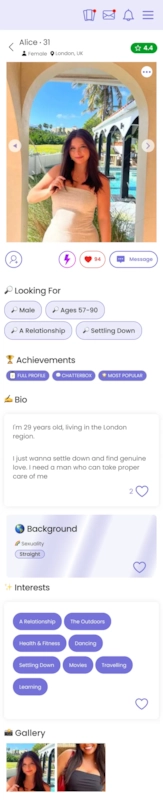
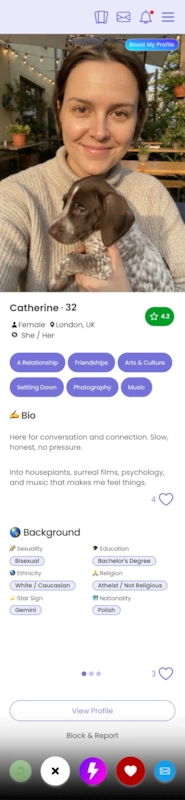
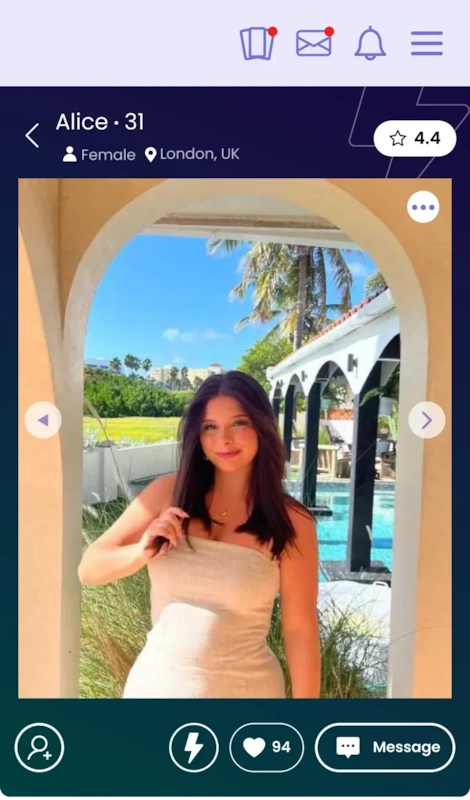
A member profile, styled in your brand's colours and copy.

Every screen, profiles included, carries your brand's colours, logo, and copy.

Your niche, your content

Customisation goes beyond how the app looks. The niche you choose changes the actual profiles and content members see. A private niche shows only the members you bring to the platform; a shared, pooled niche blends your members with others already on that niche, widening the pool they can browse.

Either way, moderation tools give you full control over who's visible — in the member feed, in the match stack, and everywhere else members browse. You're in control of both the look and feel of the app, and the profiles and content that populate it.

Polls, articles, events — and your own ad server

Beyond profiles and matching, you can publish polls, quizzes, articles, pinned posts, events, and discussions to keep the community engaged between matches.

An internal ad server lets you upload your own adverts too — to showcase what matters to your brand, or to support collabs, sponsorships, and other revenue tie-ins.

Profiles

Profiles built for trust, not just first impressions

Every profile carries a profile rating and badges & achievements members earn over time — small signals that help others gauge who they're talking to at a glance.

Writing a good profile doesn't have to start from a blank page, either: BioBooster is our built-in AI assistant that helps members put their best profile forward, and it's simple to go back and edit afterwards.

Every profile also sits behind our age assurance and identity checks before it goes live. See how that works on our Trust & Safety page →

A standard member profile.

A standard member profile.

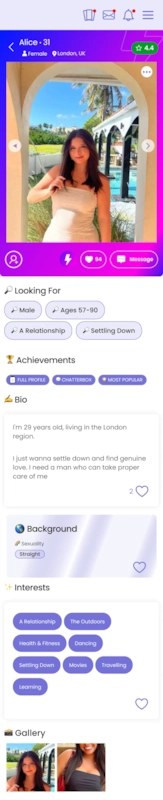
The same profile shown in the Super Matched state.

The same profile in the Super Matched state.

Messaging

Messaging, chat rooms, and private groups

Members can message one to one, join themed chat rooms, or start member-created private groups — all from the same inbox. Brands can also enable optional conversation-starter prompts to help members break the ice, alongside standard messages.

A daily limit for free members, unlimited for VIP and VIP+

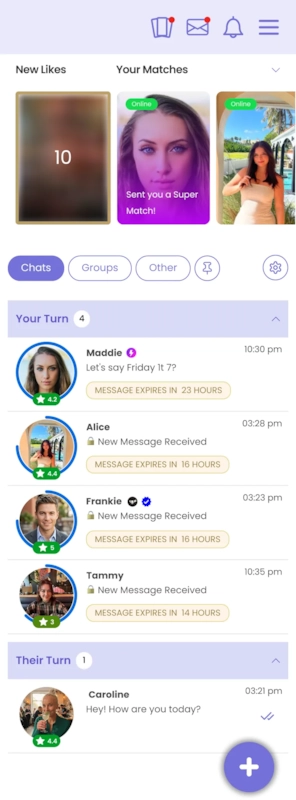
Free members get a daily reply allowance rather than unlimited messaging; VIP and VIP+ remove that limit. Message protection is also on by default across every brand — it automatically hides contact details like phone numbers and emails in conversations, since sharing them early is one of the most common precursors to scam activity. Premium members can turn it off, though we warn them clearly before they do.

The free-member inbox, with messages shown as locked until reply, each with a countdown to expiry.

The free-member inbox — messages show a locked state until reply, each with a countdown to expiry.

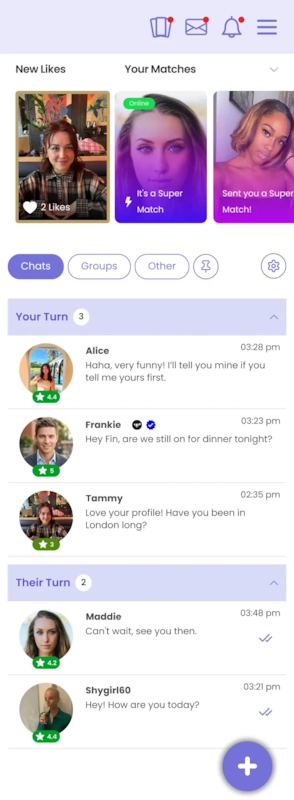
The same inbox for a VIP member, with previews and read receipts visible.

The same inbox for a VIP member — previews and read receipts are visible.

Chat rooms, private groups, and Super Match conversations

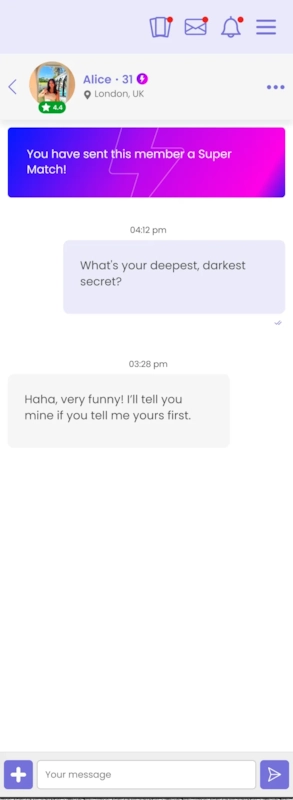
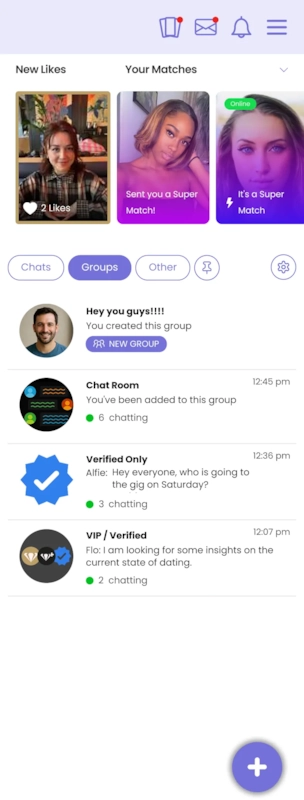
The Groups tab carries member-created private groups alongside our chat room types, so a conversation started from a Super Match sits right next to the wider community spaces.

A conversation opened by a Super Match, with a banner confirming it was sent as a Super Match.

A conversation opened by a Super Match — the banner confirms it was sent as one.

The Groups tab, showing member-created private groups alongside chat room types.

The Groups tab, carrying member-created private groups alongside our chat room types.

The Homepage

A social homepage, not just a swipe deck

The homepage brings together a member's own tabbed profile, pinned posts from the brand, and a live activity feed of what the community is doing — likes, comments, new joins and more. It's designed to feel like a community members return to, not just a matching queue.

The homepage in full, showing the tabbed profile swimlane, pinned posts, and the Activity Feed.

The homepage in full: the tabbed profile swimlane, pinned posts, and the Activity Feed.

Discovering Matches

A familiar card stack, with two ways to stand out

Members discover new people through a swipeable card stack — bio, background, lifestyle and appearance all visible at a glance. The action bar keeps it simple: pass, like, message, and Super Match for when a member wants to make sure they're noticed.

Free members can like within a daily limit; VIP and VIP+ remove that limit entirely.

The Matches card, with bio, background, lifestyle and appearance, and an action bar beneath.

The card stack — background, lifestyle and appearance sit in a scrollable row beneath the bio.

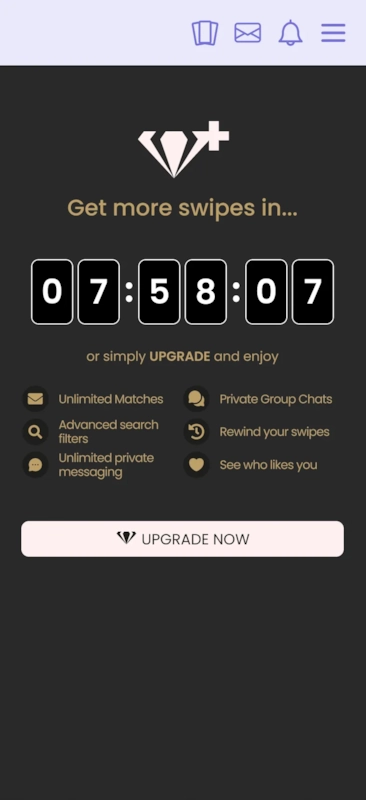
The like limit a free member sees on hitting the daily cap, with a countdown to reset.

The like limit a free member sees on hitting the daily cap, with a live countdown to reset.

Notifications

One notification centre, with an action on every card

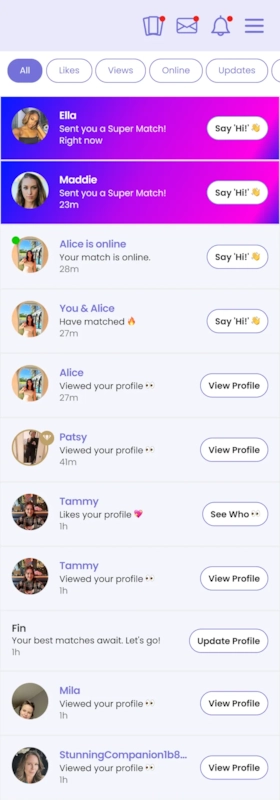
Every like, message, match and system update lands in a single notification centre, with the relevant action available directly from the card — no need to leave the feed to respond. Members can also manage notifications in bulk rather than one at a time.

The notification centre on the All tab, with each notification carrying its own contextual action.

The notification centre on the All tab — each notification carries its own contextual action.

Likes & Matches

Every like and match, organised in one place

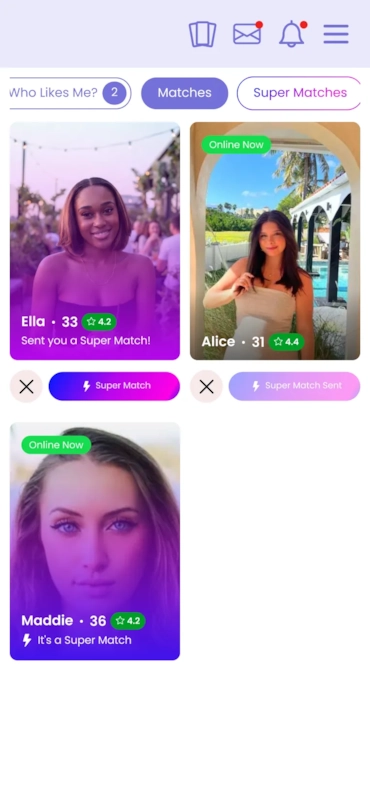
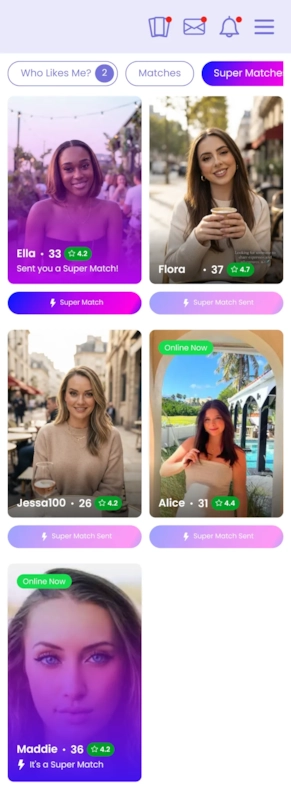
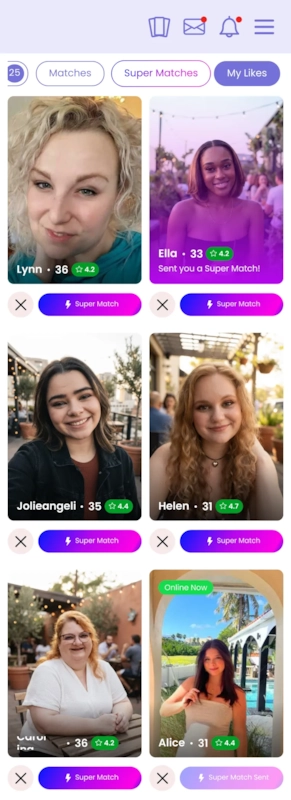
Beyond the discovery deck, a dedicated Likes & Matches area gives members a running view of where they stand: their mutual matches, their Super Matches, and the likes they've sent.

The Matches tab, with every card carrying its current state and next action.

Matches — every card carries its current state and the next action beneath it.

The Super Matches tab, showing sent, received and mutual states.

Super Matches — showing sent, received, and mutual states.

My Likes, the member's own outbound likes.

My Likes — the member's own outbound likes.

Who Likes Me

Live counts, full visibility for VIP and VIP+

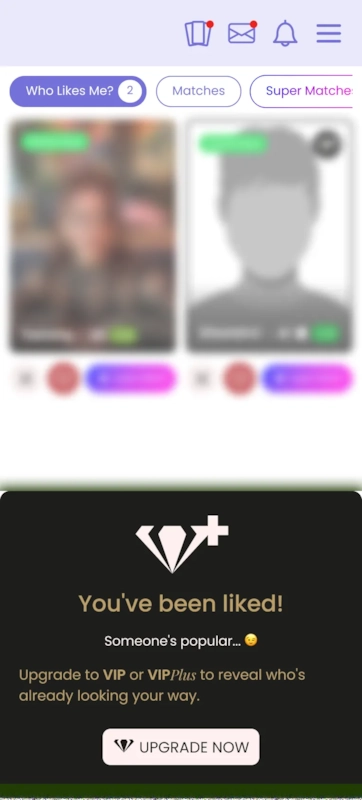
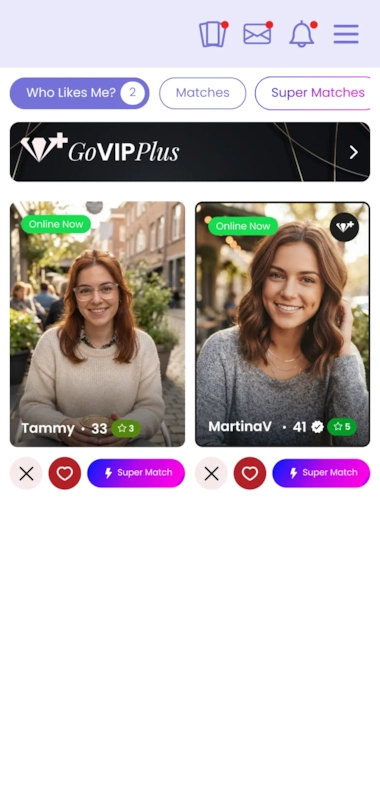
Free members see the count update live, with cards already in position. Upgrading to VIP or VIP+ reveals every photo instantly, with every like ready to act on.

Who Likes Me for a free member, with the count live and photos blurred.

Who Likes Me for a free member — the count is live, but photos stay blurred.

Who Likes Me for a VIP member, fully unblurred.

The same tab for a VIP member — fully unblurred.

Trust, Safety & Privacy

Built in from day one, covered in full elsewhere

Privacy and safety aren't bolted on — they run through every part of the members area above: Incognito browsing for members who'd rather not be seen until they choose to engage, a profile rating with one-click upvote/downvote feedback, instant blocking, and age assurance and identity verification before a profile ever goes live. Every brand also inherits the same AI and human moderation, and the same compliance and industry accreditation, regardless of platform.

Incognito browsing Profile rating & feedback Instant blocking Age assurance ID verification AI + human moderation

See our full Trust & Safety approach

How age assurance, identity verification, moderation and compliance work across every HubPeople brand — in detail.

Visit Trust & Safety →

Membership Tiers

Free, VIP, and VIP+ — plus Super Match and Boost add-ons

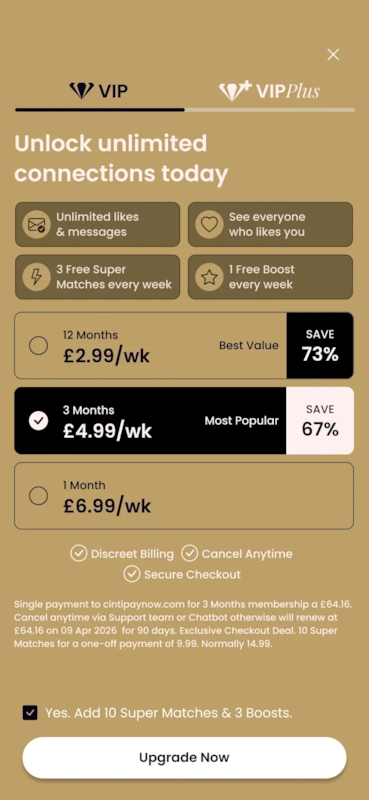
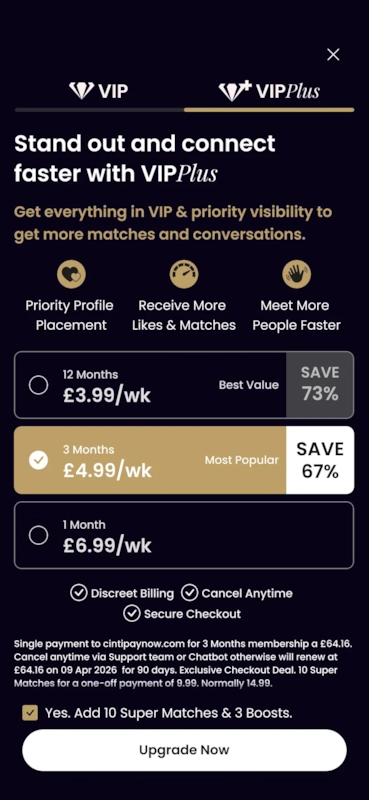
Every member starts free. From there, VIP and VIP+ unlock deeper visibility and remove the everyday limits, and Boost adds a further, temporary layer of prioritised visibility on top of either tier.

The VIP upgrade screen, with a consumable bundle pre-ticked above the call to action.

The VIP upgrade screen. A consumable bundle sits pre-ticked above the CTA.

The VIP+ upgrade screen, leading on placement and visibility.

The VIP+ upgrade screen, leading on placement and visibility rather than access alone.

What's included Free VIP VIP+
Likes & messagesLimitedUnlimitedUnlimited
See everyone who likes you
Weekly Super Matches included
Weekly Boost included
Priority profile placement
Incognito browsing

Members are entitled to a regular allowance of Super Matches and Boosts at these tiers; exact allowances are confirmed during brand setup and shown live in the app.

Consumables

Super Match and Boost: on-demand visibility, when members want it

Beyond their membership tier, members can reach for Super Match or Boost to stand out in the moment. Both are available as one-off purchases, and VIP and VIP+ members also carry an ongoing allowance of each as part of their membership.

Boost: advanced visibility, for a limited time

A Boost gives a member's profile advanced, temporary visibility throughout the platform. The profile carries a Boosted badge for the duration, and priority placement drops away automatically once it ends — no ongoing commitment required.

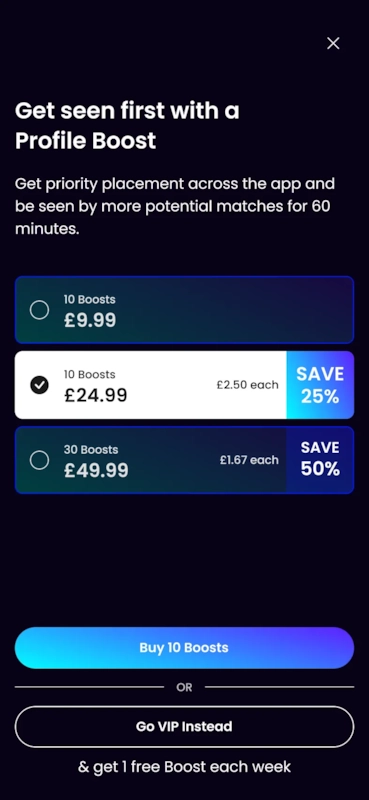
The Boost payment screen for a free member.

The Boost payment screen for a free member.

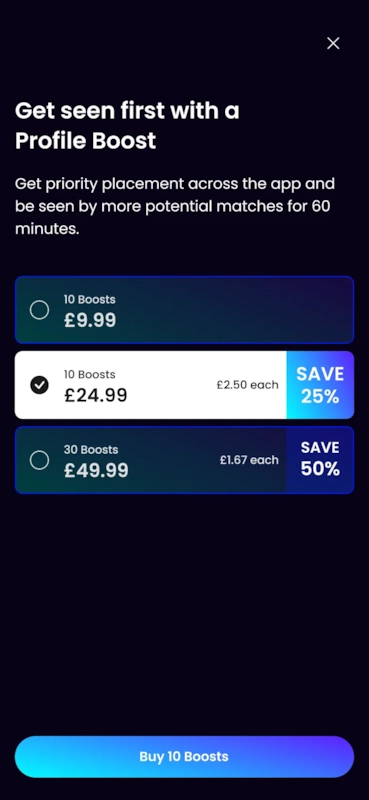
The Boost payment screen for a VIP member.

The same screen for a VIP member, whose membership already includes a regular Boost.

Super Match: a like that can't be missed

A Super Match puts a member's like at the front of the queue for its full duration, and is clearly flagged so the recipient knows it wasn't just a standard like.

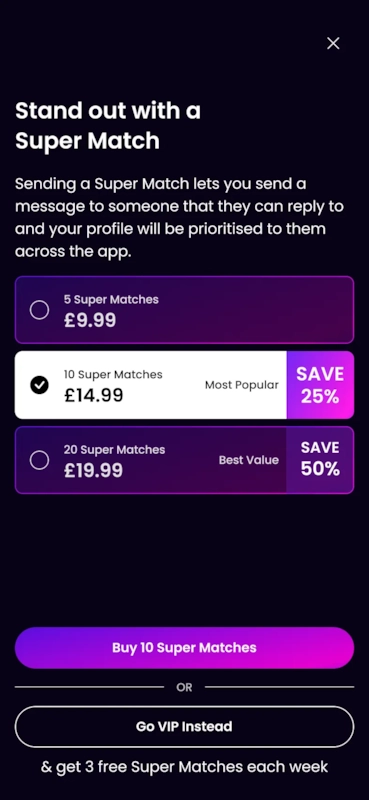
The Super Match payment screen for a free member, with a Go VIP Instead secondary option.

The Super Match screen as a free member sees it, with a "Go VIP Instead" secondary option.

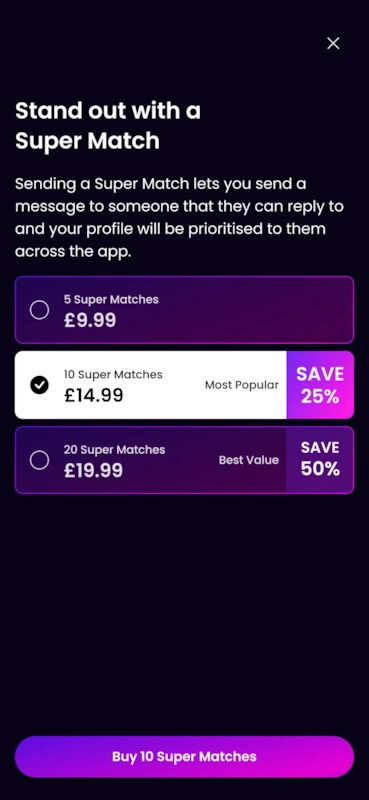
The Super Match payment screen for a VIP member.

The same screen for a VIP member — no subscription upsell needed.

A member profile while a Boost is active, with the header carrying the Boosted treatment.

A profile while a Boost is active — the header carries the Boosted treatment, right down to the action bar.

A note on the screenshots. Every screenshot on this page is illustrative. Your brand's colours and copy will differ, and pricing shown reflects current indicative UK rates only.

Get started

Ready to bring this to your brand?

Every brand you launch on HubPeople starts with the members area above already built — profiles, matching, messaging, and the trust & safety layer behind it. Choose your platform, and we'll do the rest.